
Quantum Source
Validated AltStore-compatible source
Apps
24 of 38 apps shown

VCMI Team
VCMI is a open source cross-platform HoMM3 engine written from scratch. You need data copied from original game to play. Follow instructions from https://wiki.vcmi.eu/Installation_on_iOS

PokeMMO
PokeMMO is a free to play mmorpg, come join a growing community as you level up and discover new monsters. Available now on PC, Android, iOS, Mac, and Linux.

zzanehip
OldOS is a testament to the days of yesteryear, showcasing what iOS once was ten years ago. The ethos of the app is to merge the technologies of today with a pixel-perfect recreation of the user experience of the past. The vast majority of apps in OldOS are fully functional — meaning they seamlessly integrate with the data on your phone to deliver a live, emulator-esque experience. What does this mean? Well, you can play your music in iPod, get directions in Maps, surf the web in Safari, view the current weather in Weather, and much more. By the same token, no shortcuts were taken in fully fleshing out the operating system. You can change your background, adjust settings, search apps, et cetera. There are a few apps still not ready for primetime but don't worry, they're coming soon. With OldOS, you no longer need to worry about securing a legacy iPhone to experience nostalgia — it's available on your daily driver. Part of the goal with OldOS is to enable anyone to understand how iOS works and demonstrate just how powerful SwiftUI truly is. For that reason, the entire app is open-sourced — enabling developers to learn about, modify, and add to the app. I thought building this over my last six or so months in high school and sharing it with the world would be a fun and productive endeavor. Special Features: * 🧑💻 Built almost entirely using SwiftUI. * 🎨 Designed to be as close to pixel-perfect as possible. * 📱 Fully functional, perhaps even usable as a second OS. * ❤️ A testament to the work of Apple employees of both the past and the present. * 🗺️ Fully open source for all to learn, modify, and build on.
PokeMMO
PokeMMO is a free to play mmorpg, come join a growing community as you level up and discover new monsters. Available now on PC, Android, iOS, Mac, and Linux.

OatmealDome
DolphiniOS is a port of the popular Dolphin emulator to iOS. Dolphin lets you play your favourite GameCube and Wii software with enhancements like higher resolutions, save states, and more. You can even play all of Nintendo's classics from past consoles through the Wii's Virtual Console library. Please note that devices with A8 processors and older are not compatible.

Flyinghead
Flycast is a multi-platform Sega Dreamcast, Naomi and Atomiswave emulator derived from reicast. Information about configuration and supported features can be found on TheArcadeStriker's [flycast wiki](https://github.com/TheArcadeStriker/flycast-wiki/wiki).

Gryphel Project & zydeco
Features • Emulates Mac Plus, Mac II or Mac 128K • Full simulated keyboard (including all Mac keys) • Full sound output • Uses external keyboard if available • Regulable emulation speed • Easy(ish) to import/export disk images Please check out the github README for usage instructions: https://github.com/zydeco/minivmac4ios

T-Pau
Ready is an open source emulator for the following 8 bit home computers: * Commodore 64 * Commodore VIC-20 * Commodore 16, Plus/4 * Sinclair ZX Spectrum (16k, 48k, Spectrum+, 128k, +2) With preliminary support for these computers: * Atari 600XL, 800XL * Commodore 128 * Commander X16 It is based on atari800, fuse, Vice, and x16-emulator, which provide accurate emulation of many hardware variants and peripherals. Ready requires at least iPadOS 13.5. Ready aims to approximate the feeling of using actual hardware. Rather than configuring abstract settings, you select hardware components. The software keyboard is a facsimile of the original, reflecting the different existing styles. Even the noise of the disk drive is emulated. The Library section offers a way to organize a large collection of games, demos and programs. The emulated hardware can be customized for each entry. The Inbox provides a place to quickly try new programs. You can easily move the ones you want to keep to the library. Tools mode allows attaching a cartridge like Action Replay or Final Cartridge and a collection of disks with your favorite tools, to help you dig into the programs, like back in the day.

Antique
emuThreeDS is a Nintendo 3DS emulator for Apple TV, iPad and iPhone based on Citra.

Lit Development
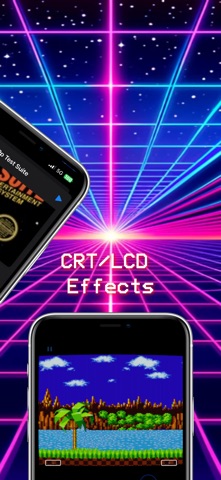
Ignited is an overhaul of Delta, an all-in-one emulator for iOS. FEATURES Supported Game Systems • Nintendo Entertainment System • Super Nintendo Entertainment System • Sega Genesis • Nintendo 64 • Game Boy (Color) • Game Boy Advance • Nintendo DS Controller Support • Supports PS4, PS5, Xbox One S, Xbox Series X, and MFi game controllers. • Supports bluetooth (and wired) keyboards, as well as the Apple Smart Keyboard. • Completely customize button mappings on a per-system, per-controller basis. • Map buttons to special "Quick Save", "Quick Load," and "Fast Forward" actions. Save States • Save and load save states for any game from the pause menu. • Lock save states to prevent them from being accidentally overwritten. • Automatically makes backup save states to ensure you never lose your progress. • Support for "Quick Saves," save states that can be quickly saved/loaded with a single button press (requires external controller or supported skin). • Save State Rewind - Rolling save states that can be rewound to for up to 2 minutes. Configurable interval. (Currently disabled) Cheats • Supports various types of cheat codes for each supported system: • NES: Game Genie • SNES: Game Genie, Pro Action Replay • N64: GameShark • GBC: Game Genie, GameShark • GBA: Action Replay, Code Breaker, GameShark • DS: Action Replay Delta Sync • Sync your games, game saves, save states, cheats, controller skins, and controller mappings between devices. • View version histories of everything you sync and optionally restore them to earlier versions. • Supports both Google Drive and Dropbox. Custom Controller Skins • Beautiful built-in controller skins for all systems. • Import controller skins made by others, or even make your own to share with the world! Hold Button • Choose buttons for Delta to hold down on your behalf, freeing up your thumbs to press other buttons instead. • Perfect for games that typically require one button be held down constantly (ex: run button in Mario games, or the A button in Mario Kart). Fast Forward • Speed through slower parts of games by running the game much faster than normal. • Easily enable or disable from the pause menu, or optionally with a mapped button on an external controller. 3D/Haptic Touch • Use 3D or Haptic Touch to "peek" at games, save states, and cheat codes. • App icon shortcuts allow quick access to your most recently played games, or optionally customize the shortcuts to always include certain games. Game Artwork • Automatically displays appropriate box art for imported games. • Change a game's artwork to anything you want, or select from the built-in game artwork database. Misc. • Gyroscope support (WarioWare: Twisted! only) • Microphone support (DS only) • Support for delta:// URL scheme to jump directly into a specific game. **Ignited and Lit Development are in no way affiliated with Nintendo. The name "Nintendo" and all associated game console names are registered trademarks of Nintendo Co., Ltd.**

Odyssey Team
Taurine is an iOS 14.0-14.3 jailbreak, utilizing Procursus and Libhooker.

ned
A fully-featured iOS client for appdb.to written in Swift 5 (iOS 10+).


Turing Software, LLC
UTM lets you run Windows® 11, Ubuntu®, or macOS fully virtualized with maximum performance. Run Windows® 7, Windows® XP, and other older operating system emulated with decent performance. Try out the new experimental 3D driver for DirectX® graphics support allowing you to run Windows® games on your Mac! UTM uses the popular QEMU system emulator securely in a sandboxed environment to protect your data from viruses and malware in the emulated operating system. Designed for macOS using the latest and greatest Apple technologies, UTM is built from the ground up with the Mac in mind. Features: • Run ARM64 operating systems such as Windows® for ARM and Ubuntu® ARM on your Apple Silicon Mac fully virtualized at near native speeds • Run Intel/AMD operating system such as Windows® 7, Windows® XP, Ubuntu® Linux, and more (emulated with limited performance on Apple Silicon Macs, fully virtualized on Intel Macs) • Run macOS 12 or higher in a virtualized environment • Run Intel applications on Linux with Rosetta(*) • Over 30 processors can be emulated by the QEMU backend including i386, x64, ARM32, ARM64, MIPS, PPC, and RISC-V for developers and enthusiasts • Supports macOS Sandbox to protect your data from any viruses or malware infecting the emulated operating system (such as Windows®) • GUI display mode, terminal console mode, and headless mode (with support for multiple displays) • Attach USB devices to your virtual machine • Experimental: GPU accelerated OpenGL+Vulkan on Linux VMs and DirectX® on Windows® VMs • Bridged and shared networking support • Run and store VMs from external drives * Snapshot management for saved states • Don't know how to use QEMU? Confused at all the options QEMU provides? UTM provides an easy to understand UI for creating and configuring VMs that does not require knowledge of QEMU command line arguments Current Limitations: We are working hard to provide new features. Below are some things currently missing from UTM. We hope to support at least some of these features in the future. • No direct mounting of external disks and drives, only mounting disk images is supported • No drag & drop of files and data, only copy paste of text and sharing of a single directory is supported with tools installed • Experimental GPU acceleration is still under active development and there may be compatibility issues with many games (*) Linux with Rosetta is only supported on Apple Silicon Macs running macOS 13 and up.


Turing Software, LLC
UTM SE is a PC emulator that allows you to run classic software and old-school games. * Supports both VGA mode for graphics and terminal mode for text-only operating systems * Emulates x86, ARM, PPC, and RISC-V architectures * Run pre-built machines or create your own configuration from scratch * Built from QEMU, a powerful and widely used emulator

Theodore Dubois
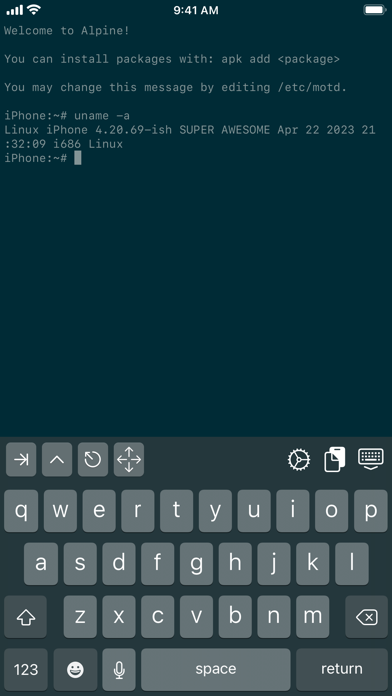
A Linux-like shell on iOS. You can edit files with sed and cat, move them around, and more! https://github.com/ish-app/ish/

rinsuki
Citra is a Nintendo 3DS emulator. This is a fork specifically compiled for iOS devices and is still in its early stages of development. You should not expect the same compatibility and performance that you might expect of the PC version of Citra.

Odyssey Team
Supporting iOS Versions: 13.0 - 13.7. Odyssey is the first jailbreak to be written almost entirely in Swift. Completely open source and welcomes community contributions and pull requests, as a tribute to the dearly departed s0uthwes and his continued optimism and faith in the project. Comes with the open source Procursus bootstrap, designed from the ground up with openness and compatiblity in mind. Along with a new tweak injection platform, libhooker.

Zhuowei
An app that removes the three app limit for free provisioning. Hit "Go" just before installing apps. Should work on iOS 16.1.2 and below / iOS 15.7.1 and below. This is very limited: • Apps still expire after a week • They still do not get arbitrary entitlements • They still must be signed. It's probably not going to be that useful. It's meant more as a demo of what you can do with MacDirtyCow.

Zhuowei + Ginsudev
An app that allows you to override the system used iOS font with one of the fonts from our built in selection. It's probably not going to be that useful. It's meant more as a demo of what you can do with MacDirtyCow.

SideStore Team
Deltroid is an all-in-one emulator for iOS. Deltroid builds upon the strengths of its predecessor Delta while improving on it in a community supported fashion. Github Repository (https://github.com/lonkelle/Deltroid) FEATURES Supported Game Systems • Nintendo Entertainment System • Super Nintendo Entertainment System • Nintendo 64 • Game Boy (Color) • Game Boy Advance • Nintendo DS • Nintendo DSi • Sega Genesis • And plenty more to come! Controller Support • Supports PS4, PS5, Xbox One S, Xbox Series X, and MFi game controllers. • Supports bluetooth (and wired) keyboards, as well as the Apple Smart Keyboard. • Completely customize button mappings on a per-system, per-controller basis. • Map buttons to special “Quick Save”, “Quick Load,” and “Fast Forward” actions. Save States • Save and load save states for any game from the pause menu. • Lock save states to prevent them from being accidentally overwritten. • Automatically makes backup save states to ensure you never lose your progress. • Support for “Quick Saves,” save states that can be quickly saved/loaded with a single button press (requires external controller). Cheats • Supports various types of cheat codes for each supported system: • NES: Game Genie • SNES: Game Genie, Pro Action Replay • N64: GameShark • GBC: Game Genie, GameShark • GBA: Action Replay, Code Breaker, GameShark • DS: Action Replay Deltroid Sync • Sync your games, game saves, save states, cheats, controller skins, and controller mappings between devices. • View version histories of everything you sync and optionally restore them to earlier versions. • Supports both Google Drive and Dropbox. Custom Controller Skins • Beautiful built-in controller skins for all systems. • Import controller skins made by others, or even make your own to share with the world! Hold Button • Choose buttons for Delta to hold down on your behalf, freeing up your thumbs to press other buttons instead. • Perfect for games that typically require one button be held down constantly (ex: run button in Mario games, or the A button in Mario Kart). Fast Forward • Speed through slower parts of games by running the game much faster than normal. • Easily enable or disable from the pause menu, or optionally with a mapped button on an external controller. 3D/Haptic Touch • Use 3D or Haptic Touch to “peek” at games, save states, and cheat codes. • App icon shortcuts allow quick access to your most recently played games, or optionally customize the shortcuts to always include certain games. Game Artwork • Automatically displays appropriate box art for imported games. • Change a game’s artwork to anything you want, or select from the built-in game artwork database. Misc. • Gyroscope support (WarioWare: Twisted! only) • Microphone support (DS only) • Support for delta:// URL scheme to jump directly into a specific game. **Deltroid and Sidestore are in no way affiliated with Nintendo. The name "Nintendo" and all associated game console names are registered trademarks of Nintendo Co., Ltd.**

nspire-emus
Third-party multi-platform emulator of the ARM-based TI-Nspire calculators.


Joseph Mattiello
Provenance EMU is a multi-console emulator for many vintage arcade and console systems. Systems: - Atari - Atari 2600 - Atari 5200 - Atari 7800 - Atari 8bit Computer - Atari Jaguar - Atari Lynx - Bandai - WonderSwan - CBS - CBS ColecoVision - Enterprise - Enterprise 128 - IBM - IBM PC DOS - Magnavox - Magnavox Odyssey2 - Mattel - Mattel Intellivision - NEC - PC98 - PCFX - SuperGrafx - TurboGrafx-16 - TurboGrafx-CD - Nintendo - 3DS - DS - Famicom Disk System - Game Boy - Game Boy Advance - Game Boy Color - GameCube - NES - Nintendo 64 - Pokémon mini - Super Nintendo - Virtual Boy - Panasonic - 3DO - Philiips - CDi - Sega - 32X - Dreamcast - Game Gear - Genesis - Master System - Saturn - Sega CD - SG-1000 - Smith Engineering - Vectrex - SNK - Neo Geo - Neo Geo Pocket - Neo Geo Pocket Color - Sony - PlayStation - PlayStation Portable - Various - Game Music - Watara - Supervision - ZX - ZX Spectrum ----- Legal Notice ----- Terms of Use (EULA): https://www.apple.com/legal/internet-services/itunes/dev/stdeula/ Privacy Policy: https://provenance-emu.com/privacy/

Jean-Philip Desjardins
Play! is a portable PlayStation2 emulator. The focus of the project is on making PlayStation2 emulation easy and accessible. Just pop in your favorite game's disc and have fun! • No BIOS required. Play! is an high-level emulator. • Easy configuration. No custom settings to fix specific games. • Available on many platforms, making sure the experience is the same quality everywhere.

yoshisuga
MAME stands for Multi Arcade Machine Emulator. This app lets you play arcade games from the past 30+ years on your iPhone, iPad, macOS, or AppleTV. More than 2000 games are supported, and the currently supported romset version is MAME 0.139u1 (September 2010). Other nifty features include: * 64-bit binary to run on modern and future iOS devices * Supports modern device screen sizes, including iPhone X/XR/XS/XS Max and iPad Pro * A native iOS/iPadOS/tvOS frontend (by @ToddLa, new in 2020!) * A native Metal rendering engine (by @ToddLa, new in 2020!) * tvOS support (new in 2019!) * An in-app web server to transfer files from your computer (new in 2019!) * Transfer ROMs, Artwork, and ROMSETs via AirDrop or iOS File Sharing (new in 2020!) * Multiple MFI controllers (up to 4 with dual analog support - @DarrenBranford) * Supports using the touch screen as a lightgun * Turbo mode toggle for buttons * Touch analog for games like Arkanoid * Builds in Xcode 11.x/12.x and runs on latest iOS 13/14 versions
14 more apps available