
Utilities
Find utility IPA listings for file management, VPNs, signing helpers, browsers, keyboard tools, backups, DNS, and system-focused apps.
Apps
24 of 101 apps shown


SoundCloud Global Limited & Co KG
What’s next in music is first on SoundCloud. Be the first to discover, play and share your favorite tracks from emerging artists Access the world’s largest music discovery platform - That’s 300M+ tracks from 30M+ artists in 193 countries Discover new music, picked just for you - Play curated mixes and playlists based on the music you love Listen to exclusive music on SoundCloud - Hear tracks you can’t find anywhere else Find and connect with your music community - Share tracks, reach a global audience, and connect with your favorite artists and fans directly on SoundCloud Upload your own tracks - Tap into a global fanbase of millions by sharing your music Help your favorite independent artists get paid - Your fan-powered streams put money in the pockets of the artists you want to support Listen to SoundCloud for free, or subscribe to SoundCloud Go or SoundCloud Go+ for premium features. SOUNDCLOUD FREE: - Play your favorite tracks from independent and established artists, with ads SOUNDCLOUD Go: - Listen without ads - Save tracks to listen offline — anywhere, anytime SOUNDCLOUD Go+: - Unlock premium Go+ tracks - Upgrade your DJ sets with exclusive app integrations - Listen without ads - Save tracks to listen offline — anywhere, anytime - Support your favorite independent artists through Fan-Powered Royalties Need help? Get in touch: https://soundcloudcommunity.com https://help.soundcloud.com https://twitter.com/SCsupport SoundCloud is available in English, Brazilian Portuguese, Dutch, French, German, Italian, Spanish and Arabic. Privacy Policy: https://soundcloud.com/pages/privacy Terms of Use: https://soundcloud.com/terms-of-use

esign.yyyue.xyz
Easy Sign (esign) is a tool that can sign IPA files without a jailbreak and is capable of injecting libraries, removing libraries, and so on.

Pwn20wnd
unc0ver is an advanced jailbreaking tool for iOS devices. Jailbreaking with unc0ver unlocks the true power of your iDevice. Customize the appearance of your device, gain full control over how your device operates, obtain access to hidden features of iOS, and more. Compatibility: • unc0ver supports iOS 11.0 through to iOS 14.3 (Excluding 13.5.1 and 13.3.1) Stability: • Utilizing the latest stable APT and Mobile Substrate, stability is guaranteed. Security: • Utilizing native system sandbox exceptions, security remains intact while enabling access to jailbreak files.


XITRIX
iTorrent officially in the AltStore! It is an ordinary torrent client for iOS with Files app support and much more. What can this app do: • Download in the background • Live Activity and Dynamic Island progress bar • Downloading on external drives • Sequential download (use VLC to watch films while loading) • Add torrent files from Share menu (Safari and other apps) • Add magnet links directly from Safari • Store files in Files app • File sharing directly from app • Download torrent by url • Download torrent by magnet • Show progress in Dynamic Island • Send notification on torrent downloaded • Web/WebDav Server • Select files download priority • Change UI to dark theme • Color personalization • RSS Feed • ???

XITRIX
iTorrent - a torrent client for iOS with Files app support. What this app can do: • Download in the background • Sequential download (use VLC to watch films while loading) • Add torrent files from Share menu (Safari and other apps) • Add magnet links directly from Safari • Store files in Files app (iOS 11+) • File sharing directly from app • Download torrent by link • Download torrent by magnet • Send notification on torrent downloaded • WebDAV Server • Select files to download or not • Change UI to dark theme • RSS Feed

Samara
Feather is a free on-device iOS application manager/installer built with UIKit for quality.


unorderly GmbH
Plan your day visually. Stay focused. Get things done. 400,000+ five-star ratings · Trusted by 1.5 million active users The daily planner built for how your brain actually works. Map your tasks and calendar onto a visual timeline, block your time with intention, and finally build a routine that sticks — whether you have ADHD or just a lot on your plate. WHY STRUCTURED WORKS Most planners give you a blank page. Structured gives you a timeline. You see your whole day laid out, with every task, event, and routine in order. It's time blocking made simple. Built for ADHD minds, busy professionals, and students who need more than a to-do list. FREE FEATURES - Visual day planner with an intuitive drag-and-drop timeline - Inbox to capture ideas fast and sort them later - Syncs across iPhone, iPad, Apple Watch, and Mac - Break big projects into sub-tasks with notes - Pomodoro focus timer, Live Activities, and interactive widgets - Color-coding and hundreds of icons to personalize your schedule - Accessibility built in: VoiceOver, Voice Control, dyslexia-friendly font, and multiple languages STRUCTURED PRO - Connect your calendars and Reminders for a complete daily schedule organizer - Build recurring tasks and routines - AI-powered day planning: draft your schedule in seconds - Replan: automatically reschedules missed or forgotten tasks - Custom notifications to match your workflow PERFECT FOR - ADHD-friendly daily planning that actually sticks - Time blocking your work and study sessions - Morning routine and evening routine planning - Students managing class timetables and study tasks - Anyone who wants a simple to-do list app with a timeline view - Habit tracking alongside your daily task planner YOUR DAY, YOUR WAY Structured isn't just a task manager or a habit tracker. It's the daily planner that puts everything in one place — so you can plan your day, build better habits, and get things done without the overwhelm. Structured Pro is available monthly, annually, or as a lifetime purchase. Terms & Privacy: https://structured.app/legal


VPN Satoshi LLC
VPN Satoshi - Decentralized, Secure, Fast and Unlimited VPN on Cosmos blockchain. - More than 40 countries worldwide - Stable and secure connection - High speed without delays - Completely secure - no leaks, no vulnerabilities - Complete anonymity and security on the Internet worldwide Simple registration without providing any personal data except for your email will create a single account on all platforms. An automatic connection to the server in a matter of seconds without complicated settings. Free technical support 24/7. Ask any questions here https://vpnsatoshi.com/ru/contacts/. Discover limitless possibilities of VPN Satoshi with a convenient Premium subscription - no ads, high speed and advanced functionalities. Terms of use: https://www.apple.com/legal/internet-services/itunes/dev/stdeula/


DEEP FLOW SOFTWARE SERVICES
Clean up your iPhone and optimize storage in seconds. Remove duplicate photos, videos, and junk emails. Cleanup helps you clear your camera roll, merge duplicate contacts, compress videos, and organize storage — all in one app. OPTIMIZE STORAGE – FREE UP SPACE WITH ONE TAP Running low on space? Cleanup gives you powerful tools to take control: - Delete duplicate photos and videos - Remove similar screenshots and lookalike videos - Compress large files without losing quality - Clean up spam and promotional emails - Delete unused contacts and tidy up your address book - Free up storage instantly with one tap. CLEAN YOUR GALLERY FAST - DELETE DUPLICATE PHOTOS No more manual browsing. Cleanup makes it easy: - Instantly detect and delete duplicate photos - Smart grouping for similar photos, with “Best” marked - Remove large, lookalike videos - Identify and delete screenshots in bulk EMAIL CLEANER - DECLUTTER YOUR INBOX Declutter your inbox in seconds: - Highlight and remove promo, spam, and unread emails - Clear out junk with one tap CONTACTS CLEANUP Keep your contacts organized and up to date: - Merge duplicates - Remove incomplete or unused entries - View and edit from one place COMPRESS VIDEOS - SAVE SPACE, KEEP QUALITY Save storage without deleting memories: - Compress large files with minimal quality loss - Select exactly which videos to compress CHARGING ANIMATIONS Turn charging into a personal moment with vivid, customizable animations. SECRET SPACE – HIDE WHAT’S PERSONAL Hide personal content in a secure, PIN-protected vault only you can access. WIDGETS Add instant cleanup tools to your Home and Lock Screens: - Battery and storage widgets - Tap to launch cleanup features quickly REVIEW BEFORE YOU DELETE Nothing is removed without your approval. After each cleaning session, you get a final review screen to double-check your selections. No accidental deletions, no surprises — you're always in control. OFFLINE AND PRIVATE Your data stays private: - No internet connection needed - No files leave your phone - No tracking or data misuse Your privacy is fully protected — even we can’t access your photos. Payment & Subscription Terms: Choose between the following subscription options for unlimited access to all features: • Weekly Subscription • Lifetime Subscription FREE TRIAL FOR 7 DAYS - OFFERING UNLIMITED GALLERY CLEANING FOR A LIMITED TIME ***You may cancel your subscription at any time*** Cleanup’s free trial allows you unlimited access to all features for the duration of 7 days. Your account will be automatically charged for renewal, based on the annual subscription plan, within 24 hours before the end of the 7 days free trial period. You can cancel auto-renewal at any time, given that the cancellation is at least 24 hours before the end of the current period. Any unused portion of a free trial period will be forfeited when making a purchase of an auto-renewing subscription. ***Manage your subscription directly from your iPhone*** Subscriptions can be managed by the user and auto-renewal can be turned off by going to the Account Settings: - Open the Settings app. - Tap your name. - Tap Subscriptions. - Tap the subscription that you want to manage. Privacy Policy: https://static-cdn-production.cleanerapi.com/app/en/privacy.html Terms of Use: https://static-cdn-production.cleanerapi.com/app/en/terms.html


Crouton LLC
Crouton is simple feature packed recipe organizer & meal planner. The best place to store your favorite recipes from where ever you find them, websites, cookbooks or a handwritten note from your Grandma. IMPORT ANYWHERE Crouton supports importing recipes from almost everywhere! Pull recipes automatically out of websites and just save the bits you need. You can also scan recipes straight out of your recipe book using AI and OCR PLAN YOUR WEEK With your favourite recipes on hand, Crouton makes it very easy to plan your meals for the week (or even long into the future). If you’re stuck for recipe ideas let Crouton automatically generate the meal plan from your organized dinner recipes. STEP BY STEP MODE Crouton offers a unique step by step mode. Focus on one recipe step at time as you cook, you can tap on ingredients within a step to get the quantity (saves you jumping back and forth between the steps and ingredients). With hands free mode you can move between steps without touching your device! Perfect for when you have messy hands. TIMERS Start timers with a tap. Crouton detects times within recipes and lets you start timers straight from the steps. A convenient heads up display keeps the times front of mind while you continue to use the app. GROCERY LISTS Create shopping lists directly from your recipes, easily copy just the ingredients you need to your list. Integrates with Reminders for convenient access. Your groceries have never been easier! CLOUD SYNCING All of your recipes are conveniently synced between all of your devices using iCloud. RECIPE FEEDS Save your favourite recipe RSS feeds into Crouton to see new recipes as they’re published from your favourite blogs. AI IMPORTING Quickly import recipes using AI. Import a recipe from a single photo with no manual entry required. Also supports plain text and images. FAMILY SHARING Share your recipes with friends and family using iCloud, so everyone knows what’s for dinner. GUIDED WEIGHING Pair to supported Bluetooth scales (such as the Acaia coffee scales) and have Crouton guide you through weighing your ingredients, avoid the mental juggling of recipe steps and amounts COMBUSTION PROBE SUPPORT Crouton pairs with Combustion's temperature prove to provide live updates on your cook Crouton also offers a range of customization including custom icons and app colors. https://www.apple.com/legal/internet-services/itunes/dev/stdeula/


Calisteniapp, Sociedad Limitada
Transform your body with Calisteniapp, the calisthenics app that adapts training to your level and helps you make real progress. Build strength, gain muscle, and improve your physique with programs created by professionals, routines that evolve with you, and safe progressions for exercises like pull-ups, handstands, and muscle-ups. Over 700 exercises, workouts at home or outdoors, and an intelligent system that adjusts training load based on your performance so you can keep progressing without plateaus. Start training with purpose and stop improvising. WHAT IS CALISTENIAPP? Calisteniapp is the calisthenics app that guides you step by step so you can progress safely, even if you’re starting from zero. Train wherever you want, with or without equipment, and move forward with clear progressions and workouts that evolve with you. When you start, the app recommends a program based on your level and goal (strength, muscle gain, aesthetics, weight loss, or skills). WHAT WILL YOU FIND? ► 40+ step-by-step guided training programs ► Skills & tricks: achieve your first pull-up, handstand, muscle-up, front lever, push-ups, back lever, planche, or human flag with guided tutorials ► Stats & tracking: access a workout calendar with session logs or check the muscle map to see which muscle groups you train the most ► Workout builder: create custom routines based on your goal, available time, and exercises ► EVO routines: a more flexible training method that adjusts daily load based on your performance, allowing safe progress without rigid plans ► Challenges: join 21-day training challenges to build strong habits ► Achievements to reward your progress WHO IS IT FOR? • Beginners: if you’re starting from scratch, you’ll find fully guided workouts to achieve your first progressions • Intermediate users: access advanced plans and create your own routines to organize your training calendar • Physical test preparation: Calisteniapp can help you prepare for fitness exams and physical assessments WHAT MAKES US DIFFERENT? • Complete calisthenics training for any goal: • Build strength and muscle • Lose weight • Improve your physique and body control • Learn new skills (handstand, muscle-up, front lever, etc.) • Improve mobility and flexibility • Boost endurance and cardio • Measurable results: track sessions and optimize your progress • Flexibility: train at home, in the park, or at the gym, with or without a pull-up bar • Safe calisthenics progressions, step by step • Continuous improvement: we’re a small, dedicated team improving the app every day FAQ - FREQUENTLY ASKED QUESTIONS Can I train without equipment? Yes. You can train at home using only your bodyweight. If you have a pull-up bar or access to calisthenics bars, you’ll unlock more exercise variations and goals. Is it suitable for beginners? Absolutely. The system suggests a calisthenics program based on your level, and the adaptive routines adjust training load to your abilities. How is progress tracked? You’ll have a training calendar with weekly and monthly stats, plus a muscle map showing which muscle groups you’ve worked the most. PRO SUBSCRIPTION • Calisteniapp includes free calisthenics routines to get started: 500+ individual routines available for free, with unlimited workout sessions. • With the PRO subscription, you unlock all programs, challenges, EVO routines, and advanced metrics. Terms of use: https://calisteniapp.com/terms Privacy policy: https://calisteniapp.com/privacy


Next Vision Limited
With 300,000+ coin types, 99% recognition accuracy, and an AI-powered database, CoinSnap is a companion for coin enthusiasts. Whether you're identifying a rare error coin, uncovering the value of a hidden gem, or organizing a collection of hundreds of coins, CoinSnap makes it fast, easy, and fun to explore the fascinating world of numismatics. Key Features: AI-Powered Coin Recognition Instantly identify coins from around the globe with a quick photo or upload. Coverage of over 240,000 coin types with an impressive 99% recognition accuracy. Supports high-resolution photography for precision results. Comprehensive Coin Information Receive detailed overviews, including coin name, origin, year of issue, mint count, and more. Check rarity levels and access up-to-date market prices. Explore multiple coin encyclopedias for in-depth knowledge. Professional Coin Analysis Identify rare misprinted coins with expert analysis reports. Access coin grading reports with detailed breakdowns and estimated market values. Backed by insights from professional numismatists. Smart Collection Management Create and manage your personalized coin collection effortlessly. Organize coins by series and track the total value of your collectibles. Keep your collection secure and accessible anytime. Why Choose CoinSnap? Lightning-fast and accurate coin recognition. Extensive database covering coins from every corner of the world. All-in-one solution for identification, grading, and collection management. About CoinSnap Premium -Subscription Name: CoinSnap Premium (Yearly with Trial) -Subscription Duration: 1 year (7 days trial) -Subscription Description: Unlock all Premium features. • Payment will be charged to iTunes Account at confirmation of purchase • Subscription automatically renews unless auto-renew is turned off at least 24 hours before the end of the current period • The account will be charged for renewal within 24 hours prior to the end of the current period, and identify the cost of the renewal • Any unused portion of a free trial period, if offered, will be forfeited when the user purchases a subscription to that publication, where applicable • Subscriptions may be managed by the user and auto-renewal may be turned off by going to the user's Account Settings after the purchase of the subscription. Please note that terms and conditions, as well as our privacy policy, apply. Terms of Use: https://app-service.coinidentifierai.com/static/user_agreement.html Privacy Policy: https://app-service.coinidentifierai.com/static/privacy_policy.html Contact us: [email protected]


Bickster LLC
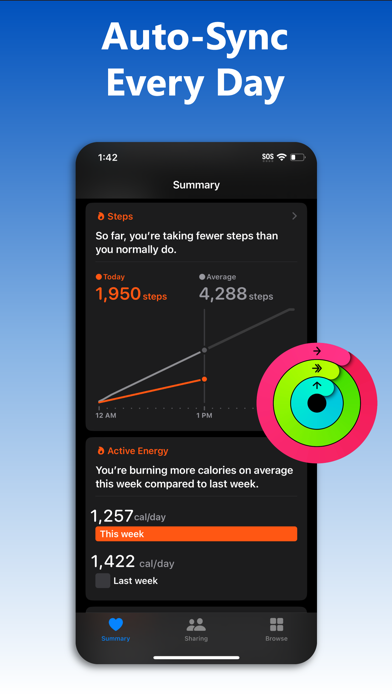
Download your entire Fitbit history and store it on your iPhone in Apple Health with myFitnessSync. Auto-sync new data in the background multiple times a day. Own your data! Works with ALL Fitbit models and the Aria scale. myFitnessSync - Fitbit to Apple Health exports up to 31 fields. You can choose which fields to sync: * Steps * Weight * Workouts - Functional Strength Training; - Traditional Strength Training; - Yoga - Cycling - Mountain Bike - Aerobics - Run - Hiking - Walk - Elliptical - Swimming * Resting Heart Rate * Walking + Running Distance * Active Energy * Resting Energy * Dietary Energy (Food Calories) * Sleep Analysis & Sleep Stages - Time In Bed - Time Asleep - REM - Deep - Light - Wake * Body Fat Percentage * Body Mass Index (BMI) * Lean Body Mass * Flights Climbed * Water / Hydration If you have any issues please contact support. We will address your questions ASAP Fitbit to Apple Health Sync exports years of data - your entire Fitbit history. We are the only app that can sync your entire Fitbit history. Our app will not overwrite any Apple Health data. Any Apple Health data you might have will not change NOTE: Fitbit restricts access to intraday heart rate data Over 10,000 5 star reviews! Our rock-solid syncing technology has synced Fitbit data to Apple Health for over 100,000 people in the last 5 years Need to sync your Apple Health app data or Apple Watch data to your Fitbit app? Try our other myFitnessSync app: Sync For Apple Health > Fitbit - http://appsto.re/us/yJr7jb.i THOUSANDS OF REVIEWS ----------------------------------- 5/5 "This app is awesome! I have an iWatch but I love the Fitbit! Finally an app that puts all my info in the iPhone health and does it correctly! Thank you" -TTWalker57 5/5 "Hard to beat software that works well!" -icanthinkofanickname 5/5 "This is the Best app to Sync Fitbit data to Health and it works perfectly. Auto sync feature works great. This is the best sync app I ever used. Best Buy!" -Karthikeyan "Very easy to use with my fitbit app and health app" "The amount of money and time that have been wasted could have been saved if I had come across this app first. Thank you!" -Mo8858 --------------------------------- Syncs with rewards programs such as Go365 We cannot respond to your questions or comments in review posts. Instead of posting questions or comments as a review please send them to [email protected] or visit our support page - http://www.bickster.zendesk.com. Thank you HOW DOES IT WORK Data is synced using 3 easy steps. After your first sync you can use One Click Sync 1. In the app, sign into Fitbit.com using your account credentials 2. Pick the fitness fields (steps, sleep, etc..) you want to sync with Apple Health 3. Click the "Sync Now" button to start syncing your Fitbit data with Apple Health To avoid seeing duplicate activity data in the Apple Health app disable fitness tracking on your iPhone. Go to Settings->Privacy->Motion & Fitness and disable Fitness Tracking Subscriptions - The app is free to sync daily steps and sleep analysis. With Pro, you can sync historical data, 31 fields, and use auto sync - Subscribers pay the fixed price for your country. Prices listed in USD - Payment will be charged to your iTunes Account upon confirmation of purchase - Subscription automatically renews unless auto-renewal is turned off at least 24 hours before the end of the current period - Your Account will be charged for renewal within 24 hours prior to the end of the current subscription period - You can manage your subscriptions and turn off auto-renewal by going to your Account Settings after purchase - When canceling a subscription, your subscription will stay active until the end of the current period Terms of Use & Privacy Policy: https://www.bickster.com/terms-privacy This product is not a Fitbit product, and Fitbit does not service or warrant the functionality of this product
翠玲 施
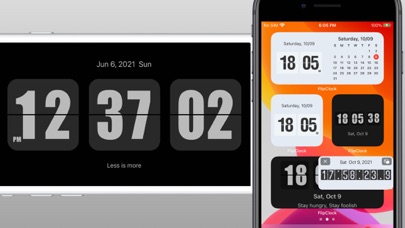
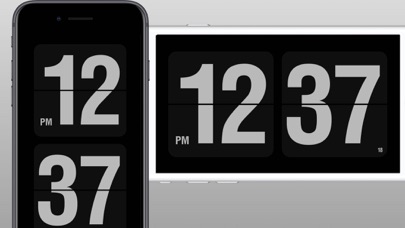
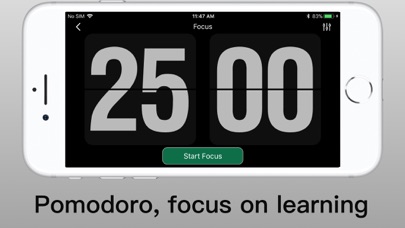
Transform your iPhone and iPad into a stylish, functional retro flip clock. Whether you need a sleek desk clock for your workspace, a soothing nightstand clock, or a personalized focus timer, Flip Clock brings classic minimalism and personal flair to your everyday workflow. Perfect for StandBy mode, Lock Screen widgets, and full-screen focus sessions. ◆ Aesthetic Clock and StandBy Mode - Full-Screen Flip Clock: Vintage flip animation with customizable themes. - OLED Burn-In Protection: Built-in pixel shifting technology protects your screen during long always-on sessions. - Show Seconds Everywhere: Real-time seconds display on Home Screen, Lock Screen, Dynamic Island, and StandBy mode. - Smart Auto-Launch: Automatically turns into a screensaver when charging. - 12/24 Hour Formats: Toggle easily with flexible date and calendar displays. ◆ Custom Signatures and Aesthetic Widgets - Personal Signatures Anywhere: Add custom text, mottoes, or signatures directly in the app and on your Lock Screen and Home Screen widgets. - Aesthetic Widgets: Beautiful, customizable widgets featuring clock, calendar, and your personal text. - Multiple Clock Themes: Personalize colors, fonts, and styles for any desk setup. ◆ Focus, Timers and Productivity Tools - Count-up and Countdown Timers: Flexible stopwatch count-up timers and precise countdown timers for workouts, study sessions, and daily tasks. - Pomodoro Technique: Stay in the flow zone with integrated study and work interval timers. - Floating Stopwatch: Keep a live floating timer widget over other apps. - Event Countdown: Track big upcoming moments like New Year's, exams, birthdays, and holidays. - White Noise Player: Soothing background sounds to boost concentration or help you sleep. ◆ Smart Alarms and Online Music Ringtones - Rich Online Music Library: Choose from a wide selection of online music tracks, ambient sounds, and ringtones to wake up your way. - Smart Volume Control: Alarms that gently wake you up by automatically adjusting volume gradually. - Hourly Chime: Friendly voice/sound timekeeping on the hour. Upgrade your desk setup and daily routine today with Flip Clock!


Fluid Touch Pte. Ltd.
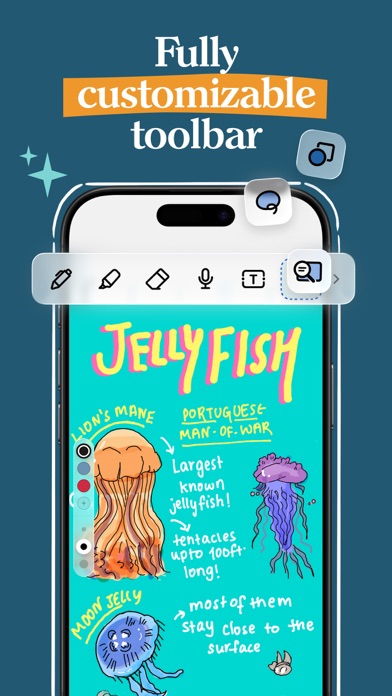
Write. Plan. Study. Work. Create. Noteshelf 3 brings natural handwriting, powerful AI, PDF annotation, audio recording and planning together in one beautiful app for iPad, iPhone and Mac. Free to start. FOR STUDENTS • Take lecture and class notes with lifelike pens, pencils and highlighters • Annotate textbooks, worksheets, slides and PDFs • Record audio while you write, so you never miss a word • Use Noteshelf AI to summarize and explain what you've learned FOR PROFESSIONALS • Capture meeting notes and record important discussions • Mark up contracts, reports and presentations • Present your notes on an external display with a laser pointer • Export and share notes as PDFs or images in one tap FOR PLANNERS & JOURNALERS • 200+ templates for digital planners, journals, diaries and trackers • Plan your days, track goals and keep a personal journal • Decorate pages with stickers, photos and custom covers WRITE NATURALLY • A smooth, natural handwriting experience built for Apple Pencil • Write, type, draw and sketch on the same page • Turn handwriting into text and search your notes in 65 languages • Choose lined, dotted or grid paper in any color WORK WITH PDFs & DOCUMENTS • Import and annotate PDFs, Word documents, PowerPoint files and images • Highlight, mark up, write and draw directly on your documents • Scan paper documents with the built-in scanner NOTESHELF AI • Summarize handwritten pages in seconds • Explain difficult terms and concepts • Translate text into other languages • Generate notes on any topic RECORD & REMEMBER • Record lectures, meetings and ideas alongside your handwritten notes STAY ORGANIZED & SECURE • Folders, subfolders, tags, bookmarks and a table of contents • Link notebooks together to connect ideas • Lock notes with a password, Face ID or Touch ID • Sync across iPad, iPhone and Mac with iCloud • Automatic backup to Google Drive, OneDrive, Dropbox or WebDAV YOUR NOTES, YOUR WAY • Custom notebook covers and a toolbar you can rearrange • Presentation mode, dark mode and flexible page layouts FREE TO START Create up to 3 notebooks with core pens and paper for free. Upgrade to Noteshelf Premium for unlimited notebooks, all templates, handwriting recognition, auto-backup and 100 monthly AI credits. Write beautifully. Work smarter. Stay organized. Terms of Use: https://www.apple.com/legal/internet-services/itunes/dev/stdeula


Cultured Code GmbH & Co. KG
Get things done! The award-winning Things app helps you plan your day, manage your projects, and make real progress toward your goals. Best of all, it’s easy to use. Within the hour, you’ll have everything off your mind and neatly organized—from routine tasks to your biggest life goals—and you can start focusing on what matters today. “Things offers the best combination of design and functionality of any app we tested, with nearly all the features of other power user applications and a delightful interface that never gets in the way of your work.” —Wirecutter, The New York Times KEY FEATURES • Your To-Dos Your basic building block is the almighty To-Do—each a small step toward a great accomplishment. You can add notes, tag it, schedule it, and break it down into smaller steps. • Your Projects Create a Project for any big goal, then add the to-dos to reach it. Use headings to structure your list as you outline your plan. There’s also a place to jot down your notes, and a deadline to keep you on schedule. • Your Areas Create an Area for each sphere of your life, such as Work, Family, Finance, and so on. This keeps everything neatly organized, and helps you see the big picture as you set your plans in motion. • Your Plan Everything on your schedule is neatly laid out in the Today and Upcoming lists, which show your to-dos and calendar events. Each morning, see what you planned for Today and decide what you want to do. The rest is down to you :) MORE THINGS TO LOVE As you dive deeper, you’ll find Things packed with helpful features. Here are just a few: • Reminders — set a time and Things will remind you. • Repeaters — automatically repeat to-dos on a schedule you set. • This Evening — a special place for your evening plans. • Calendar integration — see your events and to-dos together. • Tags — categorize your to-dos and quickly filter lists. • Quick Find — instantly locate to-dos, headings, or tags. • Type Travel — jump from list to list with your keyboard; just start typing! • Magic Plus — drag the + button to insert to-dos anywhere in a list. • Share extension — create to-dos with content from other apps. • Widgets — see lists on your home/lock screens. • Mail to Things — forward an email to Things; now it’s a to-do. • Markdown — structure & style your notes. • And much more! MADE FOR IPAD Things is tailored to the iPad, with excellent pro features as well. Chief among them is the outstanding support for your keyboard & trackpad. You can edit your to-dos without touching the screen, utilize plenty of shortcuts, and navigate your lists at blistering speed—just start typing! “Things has the best implementation of external keyboard support I’ve ever seen in an iPad app.” —Federico Viticci, MacStories You can also enjoy a beautiful dark mode at sunset, connect your calendars, open multiple windows, add a variety of widgets, scribble with Apple Pencil, create to-dos via Siri, import from Reminders—Things can do it all! There’s even Shortcuts integration if you want to automate your workflows. AWARD-WINNING DESIGN Made in Stuttgart, with two Apple Design Awards to its name, Things is a fine example of German engineering: designed not only to look fantastic, but to be perfectly functional as well. Every detail is thoughtfully considered, then polished to perfection. “It’s like the unicorn of productivity tools: deep enough for serious work, surprisingly easy to use, and gorgeous enough to enjoy staring at.” —Apple GET THINGS TODAY Whatever it is you want to accomplish in life, Things can help you get there. Install the app today and see what you can do! • Things is also available for Mac, iPhone, Apple Watch, and Apple Vision Pro (sold separately). • Sync is provided for free via our Things Cloud service. • A free trial is available for Mac: www.things.app If you have any questions, please get in touch. We provide professional support and will be glad to help you!


Cultured Code GmbH & Co. KG
Get things done! The award-winning Things app helps you plan your day, manage your projects, and make real progress toward your goals. Best of all, it’s easy to use. Within the hour, you’ll have everything off your mind and neatly organized—from routine tasks to your biggest life goals—and you can start focusing on what matters today. “Things offers the best combination of design and functionality of any app we tested, with nearly all the features of other power user applications and a delightful interface that never gets in the way of your work.” —Wirecutter, The New York Times KEY FEATURES • Your To-Dos Your basic building block is the almighty To-Do—each a small step toward a great accomplishment. You can add notes, tag it, schedule it, and break it down into smaller steps. • Your Projects Create a Project for any big goal, then add the to-dos to reach it. Use headings to structure your list as you outline your plan. There’s also a place to jot down your notes, and a deadline to keep you on schedule. • Your Areas Create an Area for each sphere of your life, such as Work, Family, Finance, and so on. This keeps everything neatly organized, and helps you see the big picture as you set your plans in motion. • Your Plan Everything on your schedule is neatly laid out in the Today and Upcoming lists, which show your to-dos and calendar events. Each morning, see what you planned for Today and decide what you want to do. The rest is down to you :) MORE THINGS TO LOVE As you dive deeper, you’ll find Things packed with helpful features. Here are just a few: • Reminders — set a time and Things will remind you. • Repeaters — automatically repeat to-dos on a schedule you set. • This Evening — a special place for your evening plans. • Calendar integration — see your events and to-dos together. • Tags — categorize your to-dos and quickly filter lists. • Quick Find — instantly find to-dos or switch between lists. • Magic Plus — drag the + button to insert to-dos anywhere in a list. • Share extension — create to-dos with content from other apps. • Widgets — see lists on your home/lock screens. • Mail to Things — forward an email to Things; now it’s a to-do. • Markdown — structure & style your notes. • And much more! MADE FOR IPHONE Things is tailored to the iPhone with deep system integrations as well. A great example is the Share extension, which allows you to create to-dos with content from other apps, such as a link to a website you want to get back to. You can also enjoy a beautiful dark mode at sunset, connect your calendars, add a variety of widgets, create to-dos via Siri, import from Reminders—Things can do it all! There’s even Shortcuts integration if you want to automate your workflows. MADE FOR APPLE WATCH Things comes with a great app for Apple Watch. Just raise your wrist to glance at your Today list, mark to-dos complete as you go, and dictate new ones on the fly—all synced instantly with your iPhone, iPad, and Mac. AWARD-WINNING DESIGN Made in Stuttgart, with two Apple Design Awards to its name, Things is a fine example of German engineering: designed not only to look fantastic, but to be perfectly functional as well. Every detail is thoughtfully considered, then polished to perfection. “It’s like the unicorn of productivity tools: deep enough for serious work, surprisingly easy to use, and gorgeous enough to enjoy staring at.” —Apple GET THINGS TODAY Whatever it is you want to accomplish in life, Things can help you get there. Install the app today and see what you can do! • Things is also available for Mac, iPad, and Apple Vision Pro (sold separately). • Sync is provided for free via our Things Cloud service. • A free trial is available for Mac: www.things.app If you have any questions, please get in touch. We provide professional support and will be glad to help you!


pinkfroot limited
Uncover the mysteries of live air traffic in one beautiful and easy to use app. Is it a bird? Is it a plane?! If it’s the latter, Plane Finder can tell you exactly which plane it is. Plane Finder is incredibly easy to use and utterly fascinating. It enables you to see live air traffic patterns with real-time tracking of almost any plane you’re interested in, and in addition to the aircraft’s location you can see its current altitude, its speed and where it’s heading. Get live information on flights - super handy when travelling. You can even be alerted when a particular flight is heading your way, which is useful if you’re trying to catch sight of rare birds such as the Airbus A380. Switch to incredible 3D flight tracking anytime from any aircraft, airport or location on the map seamlessly to view air traffic as never before. There’s a superb augmented-reality option that enables you to point your camera at the sky and see details of the aircraft that’s overhead, and with full support for iOS’s Dark Mode it’s just as handy for night flights as it is for daytime ones. It’s all great fun, but it’s also very practical: in addition to flight tracking there’s extensive airport information, which supplements live arrival and departures with live weather reports for hundreds of airports. Enjoy Plane Finder’s leading edge design as featured in Apple’s “The Power of Dark Mode” and “See it in Dark Mode” Collections 2019. Apple’s App of The Day – Jan 2020 and Top ranking since 2009. Plane Finder is also featured in Gizmodo, CNN, GMA, BBC, Sunday Times, Mail on Sunday, CNET, Wired, GQ Magazine to name a few. Trusted by friends and families of travellers, enthusiasts, pilots, cabin crew and aviation professionals alike. Choose Plane Finder for: • Live Global Flight Tracking Quickly find and track flights live on a map and explore live status information • Switch to 3D Tracking Anytime Flip instantly to 3D from any aircraft, airport or location on the map • Live AR Mode Point your camera at a plane in the sky to instantly reveal live flight and aircraft information • Live Airport Information View real time airport arrival and departure boards plus terminal, gate, baggage and weather information • Comprehensive Technical Data Dig deeper into technical aircraft and flight data • Unlimited Custom Alerts Never miss a flight, create as many custom notifications as you like and stay informed • Unlimited Global Playback Replay interesting flights and watch fascinating air traffic patterns back to 2011 • Unlimited Filters Simplify your view with powerful filters • Custom Aircraft Labels Choose the position, color and content of aircraft labels inc. logo with text label • Leading Edge Dark Mode Adopt dark mode, a bold interface perfect for low light • Curated Map Styles Switch seamlessly between simple, detailed, hybrid and satellite maps Help and Support Plane Finder is regularly updated with innovative new features. Please email [email protected] with any questions or queries, we are happy to help. How does Plane Finder work? Plane Finder receives real time ADS-B and MLAT signals sent by aircraft to transmit their positional data to land based receivers. This technology is faster than traditional radar and is used for air traffic control and navigation. You can check our worldwide flight tracking coverage for free at www.planefinder.net Disclaimer The use of the information presented using Plane Finder is strictly limited to pursuing enthusiast activities (i.e. for entertainment purposes), which specifically exclude any activities that might endanger yourself or the lives of others. Under no circumstances will the developer of this application be held responsible for incidents resulting from the use of the data or its interpretation or its use contrary to this agreement. Privacy Policy: https://planefinder.net/legal/privacy-policy Terms of Use: https://planefinder.net/legal/terms-and-conditions



Aidana Kengbeiil
Car Parking Multiplayer: open-world multiplayer mode, 200+ cars, tuning, racing and free walking! Thousands of players are waiting for you. Join us! Multiplayer open world mode • Free walking. • Free open world with real gas stations and car services. • Compete against real players in the multiplayer racing. • Exchange cars with real players. • Thousands of real players every day. • Friend list. • Voice Chat. • Police mode. • Role Play: become a taxi, cargo or delivery driver. • Drone Mode: explore the world and take stunning screenshots. • Daily Tasks and Rewards: collect coins and presents by completing the tasks and joining the game. • Character customization: variety of clothes and skins to choose. • Animations: choose among dozens of animations and reactions. Car customization • Adjustable suspension, wheel angle and more. • Engine tuning: swap engine, turbo, gearbox and exhaust. • Visual auto tunings: Dynamic vinyls, car body parts. • Car Plate: choose among 6 plate types and customize it. High-quality open world • Highly-detailed environments • 130+ cars with the real interior. • Buildings with interior Amazing gameplay • 82 real-life parking and driving challenges. • Different vehicles: Tow truck, pickup, trucks, sport and classic cars. Privacy Policy: https://olzhass.net/Car_Parking_Multiplayer_Privacy_Policy.html EULA: https://olzhass.net/Car_Parking_Multiplayer_EULA.html


Mobivalley
Play as many rounds as you like, free and with no ads. Pro adds countries, rules and more. Drop into a street somewhere in the world, look around, and guess where you are on the map. The closer your guess, the more points you score. Place Guesser is a geography game played through real street-level imagery from Apple Look Around and Google Street View. HOW YOU PLAY • Play now: five rounds around the world, three minutes each, one tap from the home screen. • NEW Maps: 63 themed maps, from NFL stadiums, castles and lighthouses to 15 world cities. 2 free maps every day. • Daily Challenge: the same mystery places for everyone, every day, with a global leaderboard. Keep your streak alive. • Country Streak: how many countries can you name in a row before you miss? • Guess The Spot: a close-up that zooms out with every wrong answer. Fewer clues, more points. • Infinite Mode: keep going as long as you like. • Custom games: pick the timer, the number of rounds and how you're allowed to move. PLAY WITH FRIENDS • Real-time multiplayer: play the same places at the same time. • Async challenges: send a challenge and let friends play whenever they like. • Game Center leaderboards, achievements and friends boards. TRACK YOUR PROGRESS • A Passport of every country you've visited, with bronze, silver and gold medals. • Day streaks with streak freezes, so one busy day doesn't cost you everything. • Stats, personal bests and shareable result cards. MORE WAYS TO PLAY • Home screen widgets. • Apple Watch and Apple TV apps. PLACE GUESSER PRO • Unlimited Maps. • Choose a country and play only there. • Worldwide Pro: the full location pool, including Street View locations. • No Move and NMPZ rules (no move, no pan, no zoom). • The Daily Challenge archive: replay the last 30 days. • Longer timers, extra streak freezes and streak repair. Pro is an auto-renewing subscription. Payment is charged to your Apple Account at confirmation. It renews automatically unless you cancel at least 24 hours before the end of the current period. Manage or cancel in your App Store account settings. Terms of Use: https://www.apple.com/legal/internet-services/itunes/dev/stdeula/


SMART MEDIA INTERNET MARKETING LTD
Transform Your Screen with AI-Generated Art and 4D Live Wallpapers Join millions discovering unique wallpapers powered by AI technology and curated artwork from talented artists worldwide. Create your own custom wallpapers with AI or explore thousands of handpicked designs. KEY FEATURES AI Art Generator • Create unique wallpapers with text prompts • Generate custom artwork in seconds • Multiple art styles and themes • Save and share your AI creations 4D Live Wallpapers • Dynamic animated backgrounds • Parallax depth effects • Smooth motion wallpapers • Optimized for battery efficiency Global Artist Community • Curated artwork from worldwide creators • Support independent artists • Exclusive original designs • New additions daily Smart Categories • Anime & Manga collections • Dark mode & AMOLED optimized • Nature & landscapes • Abstract & minimalist • Space & sci-fi themes Advanced Features • Auto-resolution optimization • Multi-language support (20+ languages) • Favorites collection • Download for offline use • Share with friends Premium Benefits • Unlimited AI generations • Ad-free experience • Exclusive wallpapers • Priority downloads • Early access to new features Perfect For • iPhone and iPad optimization • All screen sizes supported • Portrait and landscape modes • Lock screen and home screen • Widget backgrounds Why Choose Walli? • High-quality 4K resolution • Regular content updates • Artist profiles and portfolios • Smart search and discovery • Lightweight app size SUBSCRIPTION DETAILS Premium subscription unlocks unlimited AI generations, removes ads, and provides access to exclusive content. • Payment charged to iTunes Account at confirmation • Subscription auto-renews unless turned off 24 hours before period ends • Manage subscription in Account Settings • Free trial forfeited when purchasing subscription Terms of Service: https://tap.pm/terms-of-service-general/ Privacy Policy: https://tap.pm/privacy-policy-walli/ Contact: [email protected]


PeopleFun, Inc.
Playing Wordscapes 10 mins a day sharpens your mind and prepares you for your daily life and challenges! This text twist of a word game is tremendous brain challenging fun. Enjoy modern word puzzles with word searching, anagrams, and crosswords! Immerse yourself into the beautiful scenery backgrounds to relax and ease your mind. Now available in 5 languages! Enjoy the Wordscapes experience in English, Spanish, German, French, and Portuguese. Challenge yourself to connect letters and find as many hidden words as you can in relaxing games! Unlock stunning landscape backgrounds to escape from home and relax your brain. You’ll never experience a dull moment after you try this word puzzle game! Play this crossword puzzle once and you won’t be able to put it down. Enjoy word connect and word find games? This is your final destination! ►Escape and play relaxing games while visiting the beautiful destinations of Wordscapes! ► Show your vocabulary power by connecting letters and finding all the hidden words. ► Get your word hunt on with over 6,000 crossword puzzles! ► Challenge your brain and vocabulary – this crossword puzzle starts easy and becomes challenging fast! ► Think you can beat these anagram word puzzles? They start simply but ramp up fast! ► Take each level at your own pace with unlimited tries. Simply fun and relaxation! Wordscapes is the word puzzle game for adults that over 10 million people just can't stop playing! It's a great fit for fans of crossword, word connect, spelling games, and word anagram games, combining word find games and crossword puzzles. Not to mention our relaxing games have gorgeous landscapes to visit! Looking for a break that still feels productive? These brain games offer just that! Wordscapes is a great puzzle game for adults who love words and beautiful visuals. If you're looking for brain games that aren’t stressful, Wordscapes is a great pick. It’s smart, satisfying, and one of the most calming puzzle games for adults you’ll find. Wordscapes gives you that “just one more level” feeling. It’s no surprise it’s a favorite among brain games and a go-to choice for fans of puzzle games for adults Wordscapes an exciting word puzzle game that’s easy to pick up and hard to put down. With calming visuals and clever levels, it’s a refreshing way to unwind while keeping your mind young. Terms of service: https://www.peoplefun.com/terms


Grailr LLC
CARROT Weather is a crazy-powerful (and privacy-conscious) weather app that delivers hilariously twisted forecasts. ** Winner of Apple's App of the Year, Apple Design Award, and App Store Editors' Choice. Featured by The New York Times, Good Morning America, CNN, Wired, & more! ** Overflowing With Personality Choose one of five personalities for CARROT, from the straitlaced “professional” to the profanity-laden “overkill.” You’ll actually be looking forward to a torrential downpour just to see what your weather robot has in store for you! Accurate & Detailed CARROT’s super accurate weather data gives you lightning-quick access to your current, hourly, and daily forecasts. And the easy-to-read details screens are just dripping with with meteorological goodness. Privacy First Your personal information, including your location data, will never be sold to third parties. More Than A Weather App Complete activities to strengthen your relationship with the homicidal A.I. Follow clues to track down 150+ secret locations. Unlock 80+ achievements. Film your own TV-news-style weather report videos. Or use Augmented Reality Mode to bring CARROT right into your living room. Join Premium Club to unlock: - More weather data sources, including The Weather Channel, AccuWeather, and Apple Weather - Notifications, including precipitation, weather alerts, and lightning strikes (where available) - Lock & Home Screen widgets - Live Activities - Apple Watch complications and background updates - Weather maps with next-hour radar, individual radar stations, and many different layers (where available) - Customization of the entire user interface - CarPlay app - And so much more! Don’t make CARROT angry. Download her now! --- CARROT Weather uses auto-renewing subscriptions. Premium provides additional features like weather data sources, notifications, customization, widgets, and Apple Watch complications. Premium Ultra includes all the features of Premium, plus rain, lightning, and storm cell notifications (where available), a CarPlay app, super-res radar, a weather maps widget, multi-model forecasts, and quick data source switching. Premium Family includes all the features of Premium Ultra, with the added benefit of being shareable with up to five family members via Apple’s Family Sharing service. Payment will be charged to your Apple ID account at the confirmation of purchase. The subscription automatically renews unless it is canceled at least 24 hours before the end of the current period. Your account will be charged for renewal within 24 hours prior to the end of the current period. You can manage and cancel your subscriptions by going to your App Store account settings after purchase. Cancellation of the current active subscription period is not allowed. Terms of Use: http://support.meetcarrot.com/weather/terms.html Privacy Policy: http://support.meetcarrot.com/weather/privacypolicy.html


Edwin Chan
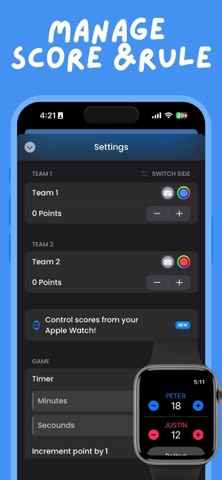
Scoreboard is a simple, clean, and easy-to-use app for tracking scores in sports, recreational activities, and family-friendly games. Whether you’re keeping score during a sports match, a training session, a school activity, or a casual board game, Scoreboard helps you stay focused without pen and paper. Key features • Effortless score tracking for two teams or players • Custom player or team names • Optional profile images for easy identification • Adjustable point increments and winning score • Theme color customization • Font style and size adjustments • Increase points with a tap or swipe up, decrease with a swipe down • Automatic game saving • Dark Mode support • Control the scoreboard from your Apple Watch • Update scores hands-free using Siri Shortcuts Designed for a wide range of sports and activities, including basketball, soccer, pickleball, tennis, table tennis, badminton, volleyball, hockey, golf, baseball, bowling, cricket, and board games. Scoreboard is designed for general audiences and focuses on sports, training, education, and recreational use. Unlock additional customization and features with an auto-renewing yearly subscription for $17.99 USD per year. Privacy Policy: https://docs.google.com/document/d/1Job3EQpVdnOLdgYssAn-6GWYbheWIO5ftKh0CQzuve8/edit Terms of Service: https://www.apple.com/legal/internet-services/itunes/dev/stdeula/
77 more apps available